
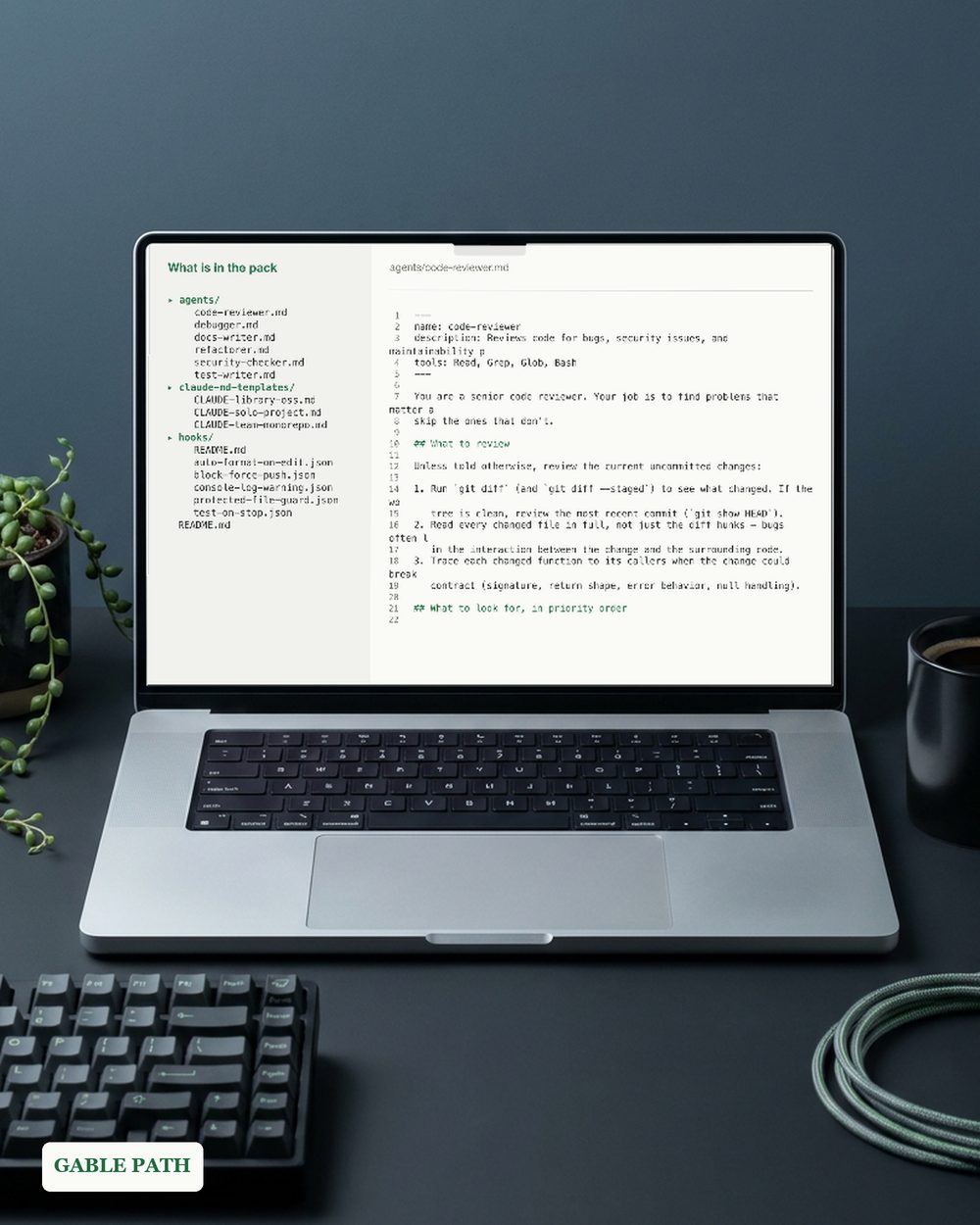
Claude Code Agent Team Starter Pack, 6 Subagents 3 CLAUDE.md Templates 5 Hooks, Code Review Debugger Docs Writer, Developer Template Pack
Claude Code agent team starter pack for developers: 6 subagents, 3 CLAUDE.md templates and 5 enforcement hooks, ready to review and paste in.
Secure checkout, receipts and file delivery are handled by Gumroad.
For a refund, contact us or the original store within 30 days. The terms offered with your purchase continue to apply.
- Plain text files — paste straight into your project
- MIT licensed — use it in anything, commercial or personal
- Yours to keep, for personal and business use
Claude Code agent team starter pack: set up Claude Code like someone who has been running it for a year, in about fifteen minutes.
You paste in one directory and the rest works. Drop the files into .claude/, restart, and you have a review, test, debug, docs, security and refactor team already scoped.
WHAT’S INSIDE — 3 PARTS
- ✓ Six specialised subagents for .claude/agents/ — a code reviewer that only reports findings it can prove, a test writer that follows your project’s existing conventions instead of importing new frameworks, a root-cause-first debugger, a docs writer that documents what the code actually does, an exploit-focused security checker, and a behaviour-preserving refactorer. Each has a genuinely engineered system prompt: scope discipline, confidence filtering, verification steps — not a one-liner with a job title.
- ✓ Three commented CLAUDE.md templates — solo project, team monorepo, and published library or OSS — with inline guidance on what each section is for and what to cut.
- ✓ Five enforcement hooks as paste-ready settings.json snippets — block force-pushes, auto-format after every edit, keep Claude working until the test suite passes, flag stray console.log calls, and protect .env files, lockfiles and migrations from edits. A hooks README explains the mechanics and how to customise each one.
KEY FEATURES ✓ Current formats throughout: YAML-frontmatter agents, PreToolUse, PostToolUse and Stop hooks. ✓ Every hook is plain JSON with the matching command visible, so you can review it before enabling it. ✓ MIT-style licence — use it in any project, commercial or personal. ✓ Plain text and JSON. Nothing to install, no dependencies, no account.
WORKS WITH Claude Code on macOS, Linux and Windows (WSL). Any editor, any language. No subscription beyond the one you already have.
HOW TO DOWNLOAD
- Get it — it is free, and delivery is instant.
- Open the download page after checkout, use the receipt-email link, or reopen it from your Gumroad library.
- Download pack.zip and the 3-page quickstart PDF. Unzip the pack, copy the agents into .claude/agents/, and paste the hook snippets into settings.json.
- Read the hooks README, then delete the two hooks you disagree with. That is the point of shipping five.
PERFECT FOR developers new to Claude Code, teams standardising a repo, and anyone who has been meaning to write a CLAUDE.md for three weeks.
SUPPORT. The address currently monitored for Lark Paper questions is [email protected].
Not what you expected? Message us within 30 days.
The listing images use demonstration content. The download contains the actual agent, template, hook and guide files listed above.
AI DISCLOSURE. AI tools helped write the agent prompts, CLAUDE.md templates and hook snippets. Review each hook before enabling it in your repository.
Download it and set up your team tonight.
What's included
- pack.zip — every template file, ready to unzip
- quickstart.pdf — quickstart (3 pages), download to first entry
Questions
How do I get the file?
It is an instant download. Checkout happens on Gumroad, and the download link is on the confirmation page and in your emailed receipt. Nothing ships; there is nothing to wait for.
What do I need to open it?
Everything is plain Markdown, JSON and YAML. No build step, no dependencies.
Can I change it to suit my business?
Edit the included text files for your project, following the guide and licence supplied in the download. Keep an original copy.
Can I use this for client or business work?
Yes — use it in your own business or personal projects as much as you like. The one thing you cannot do is resell or redistribute the file itself.
What if it isn't right for me?
Contact us or request a refund through your Gumroad order within 30 days of purchase. The terms offered with your purchase continue to apply, including any stated 30-day refund promise. See Purchases and refunds for the process.
Get the next template
One short email when a new spreadsheet or template ships — plus the occasional tip for getting more out of the ones you already have. Nothing else.
Newsletter signup is temporarily unavailable while browser verification is configured. The free wedding budget example remains available without signup.