
Mileage Tracker Tax Deduction Spreadsheet, Mileage Log Book Business Driving Log, Monthly Deduction Summary, Excel Google Sheets
Mileage tracker tax deduction spreadsheet in XLSX format. Enter one-way miles, tick round trip, and the deduction totals itself monthly.
Secure checkout, receipts and file delivery are handled by Etsy or Gumroad.
For a refund, contact us or the original store within 30 days. The terms offered with your purchase continue to apply.
- Delivered as an XLSX file for compatible spreadsheet apps
- Sheet protection is supplied in the XLSX; conversion behavior can differ
- Yours to keep, for personal and business use
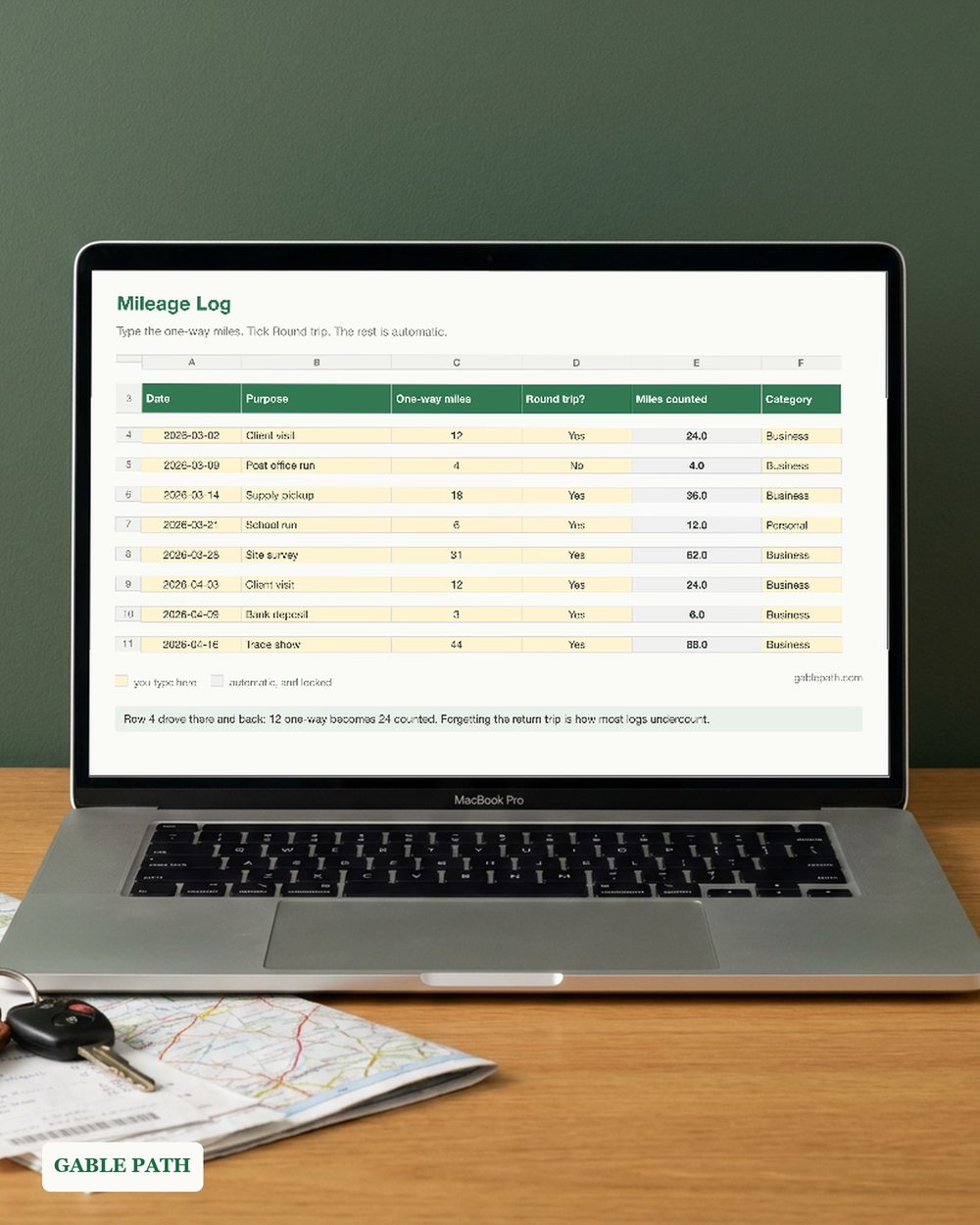
Mileage tracker tax deduction spreadsheet, built to stop the one mistake every mileage log makes: you write down the drive out and forget the drive back.
So this one asks for the one-way distance and a tick box. Drove there and back? Tick it. The sheet doubles the miles for you, every time, without you having to remember. You type in one tab and everything else fills itself in — your business miles and your deduction add themselves up as you go, on the front page and broken out month by month. No reconstructing a year of driving from calendar entries the week before a deadline.
WHAT’S INSIDE — 3 TABS
- ✓ Trips — 500 rows, with dropdowns for round trip and for category (Business, Personal, Medical, Charity). Only Business counts toward the deduction, so you can keep one honest log of everything you drive.
- ✓ Monthly Summary — business miles, deduction value, all miles and trip count for every month, plus a year total.
- ✓ Read Me First — your rate, your tax year, and the two numbers you actually want: business miles and what they are worth.
KEY FEATURES ✓ Round-trip doubling, done by the sheet rather than by you. ✓ Locked formulas. Grey cells are protected, yellow cells are yours, and no password is set. ✓ Dropdowns for category and round trip, so a year of rows stays consistent. ✓ No rate is printed in the file. The standard rate changes most years and has been revised mid-year before, so it is a cell you set, with a pointer to irs.gov. A wrong rate in a tax tool is worse than no rate at all. ✓ 4-page quickstart PDF included.
PERFECT FOR self-employed drivers, 1099 contractors, rideshare and delivery drivers, real estate agents, mobile trades, and anyone claiming vehicle miles.
PLEASE NOTE. Digital download; nothing is shipped. Personal and internal business use, no resale. A record-keeping tool, not tax advice — which trips qualify, and whether the standard rate or actual expenses suits you better, is a question for your accountant.
The listing images use demonstration names and numbers. The download is the reusable template, with entry rows ready for your own work.
WORKS WITH XLSX format. Excel and Google Sheets behavior has not been independently verified. Google Sheets: import the .xlsx with File > Import > Upload. This conversion has not been independently verified; keep the original as a backup and spot-check key totals and times. Use a larger screen when reviewing full tables.
HOW TO DOWNLOAD
- Buy. Delivery is instant — nothing ships.
- Open the marketplace download page after checkout. Account buyers can also reopen the order from their purchases or library; guest buyers use the receipt-email link. If the app shows no download button, use a browser.
- Download the workbook and the 4-page quickstart PDF.
- Fill in the yellow cells. You are running.
SUPPORT. The address currently monitored for Lark Paper questions is [email protected].
Not what you expected? Message us within 30 days.
AI DISCLOSURE. AI tools helped build the formulas, layout and wording.
Add to cart and start tonight.
What's included
- mileage-log.xlsx — XLSX spreadsheet
- quickstart.pdf — quickstart (4 pages), download to first entry
Questions
How do I get the file?
It is an instant download. Checkout happens on Etsy or Gumroad, and the download link is on the confirmation page and in your emailed receipt. Nothing ships; there is nothing to wait for.
What do I need to open it?
Supplied as XLSX. Native Microsoft Excel and Google Sheets behavior has not been independently verified. Keep the original as a backup, and spot-check key totals and times in any imported or converted copy.
Can I change it to suit my business?
Use the marked input cells and follow this workbook's setup guide. Keep a clean original before changing formulas or sheet structure. Renaming categories or sheets can affect formulas; check the results after making changes.
Can I use this for client or business work?
Yes — use it in your own business or personal projects as much as you like. The one thing you cannot do is resell or redistribute the file itself.
What if it isn't right for me?
Contact us or request a refund through your Etsy or Gumroad order within 30 days of purchase. The terms offered with your purchase continue to apply, including any stated 30-day refund promise. See Purchases and refunds for the process.
Get the next template
One short email when a new spreadsheet or template ships — plus the occasional tip for getting more out of the ones you already have. Nothing else.
Newsletter signup is temporarily unavailable while browser verification is configured. The free wedding budget example remains available without signup.